10 Best Free Android Apps for 2026 (Useful & Trusted)
Looking for the best free Android apps to install in 2026? This list skips gimmicks and covers ten genuinely useful apps that are free to use, available on Google Play, and come from well-known developers or open-source projects. For each one we say what it is good for and what the free version includes. Always check the current Google Play listing, because features and plans change.
Best free Android apps at a glance
| App | Category | Why it is on the list |
|---|---|---|
| Firefox | Browser | Fast, private, supports extensions |
| Signal | Messaging | End-to-end encrypted by default, non-profit |
| Bitwarden | Passwords | Open-source password manager with a free plan |
| VLC | Video player | Plays almost anything, no ads |
| Snapseed | Photo editing | Powerful editor from Google, no ads |
| Files by Google | Storage | Cleans up space and shares files offline |
| Organic Maps | Offline maps | Open-source, works without internet |
| Google Keep | Notes | Simple notes and checklists that sync |
| Proton VPN | Privacy | Free plan with no data limit |
| Duolingo | Learning | Free language lessons |

1. Firefox – private browsing with extensions
Firefox for Android supports a growing list of extensions, including ad blockers, and has strong tracking protection built in. It is made by the non-profit Mozilla, which makes it an easy first pick among the best free Android apps.
2. Signal – secure messaging
Signal encrypts messages and calls end to end by default and is run by the non-profit Signal Foundation. It is free with no ads.
3. Bitwarden – free password manager
Bitwarden is open-source and its free plan stores unlimited passwords across devices. A password manager is one of the best free Android apps for security, because it lets you use a different password everywhere.
4. VLC – the video player that plays everything
VLC handles MKV, MP4, FLAC, subtitles and network streams with no ads or purchases. Our VLC APK guide covers setup.
5. Snapseed – free photo editing
Snapseed by Google offers professional tools like Selective, Healing and Curves for free. See more in our best photo editor apps list.
6. Files by Google – free up storage
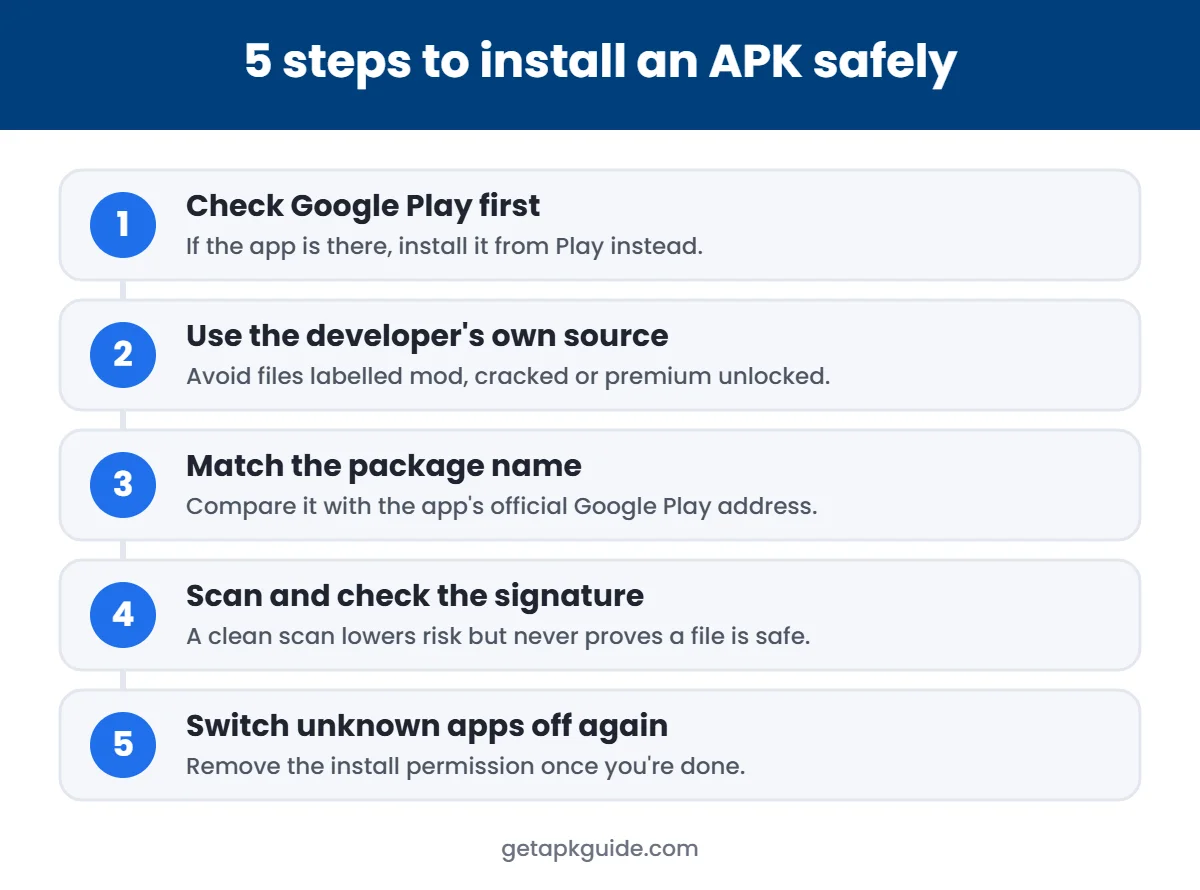
Files by Google finds duplicates, large files and junk, and can share files with nearby phones without internet. It also opens APK files when you need to install one. See how to install APK files safely.
7. Organic Maps – offline maps
Organic Maps is an open-source offline map app based on OpenStreetMap, and one of the best free Android apps for travel. Download a country once and navigate without a data connection.
8. Google Keep – quick notes
Keep is one of the simplest of the best free Android apps: notes, checklists, voice memos and reminders that sync with your Google account.
9. Proton VPN – free VPN without data limits
Proton VPN’s free plan does not cap your data, which is rare among free VPNs. Be wary of unknown free VPN apps; many sell browsing data.
10. Duolingo – learn a language for free
Duolingo’s free version includes full courses, with ads, which is why it belongs on any list of the best free Android apps for learning. A subscription removes ads and adds extras.
How we chose the best free Android apps
- Available on Google Play from the real developer.
- Free version is genuinely useful, not a trial.
- Well-known developer, non-profit or open-source project.
- No “premium unlocked” or mod versions recommended. Read why mod APKs are risky.
Free apps to be careful with
- Unknown “phone cleaner” or “battery booster” apps – Android manages this itself.
- Free VPNs from unknown developers.
- Any app that asks for accessibility or SMS access without a clear reason.
- Apps that are not on Google Play, such as SnapTube.
FAQ
What are the best free Android apps everyone should have?
A secure browser (Firefox), a password manager (Bitwarden), a private messenger (Signal) and a good file manager (Files by Google) cover the basics for most people.
Are free Android apps safe?
Free apps from well-known developers on Google Play are generally safe. Check the Data safety section and permissions before installing.
Are these apps completely free?
All have useful free versions. Some, like Duolingo and Proton VPN, also offer paid plans.
Where should I download free Android apps?
From Google Play. If an app is not there, use the developer’s official site and follow our safe install guide.


