APK Install Help: Sideloading & Error Fixes

APK install help in plain steps for installing Android apps outside Google Play: choosing a trustworthy source, checking an APK before you open it, Android’s 2026 developer verification rules, and fixes for the most common installation errors.
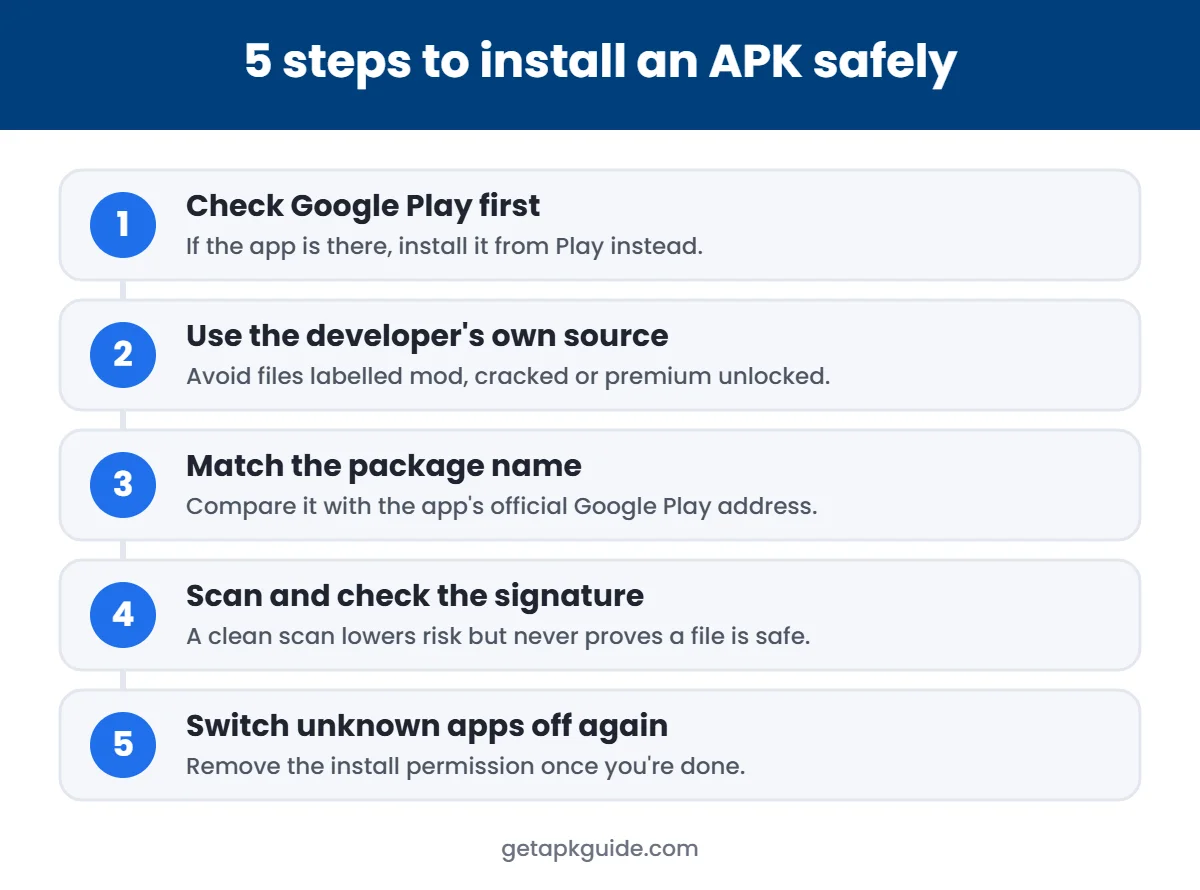
APK install checklist: before you start
- Check Google Play first. If the app is there, install it from Play instead.
- Use the developer’s own source or an established store. Avoid files labelled mod, cracked or “premium unlocked”.
- Match the package name with the app’s official Google Play address.
- Scan the file — and remember a clean scan reduces risk but doesn’t prove safety.
- Turn “Install unknown apps” off again after installing.
All APK install guides
APK vs AAB: What Is the Difference? (Simple 2026 Guide)
A simple guide to APK vs AAB: what each format is, why Google Play uses App Bundles, and…

Is Aptoide Safe? Honest 2026 Review
An honest 2026 review of Aptoide: how it works, the 2020 data breach, Play Protect warnings, pirated app…
APK Not Installing on Android 14? 5 Fixes That Work (2026)
Why APK files fail to install on Android 14 and later, and 5 safe fixes for old target…

How to Install APK on Firestick 2026: Easy Downloader Method
Easy 2026 guide to install APK files on Fire TV Stick with the Downloader app, plus how to…
How to Install APK on Android TV: Step by Step 2026
Step-by-step guide to install APK files on Android TV and Google TV safely in 2026, with fixes for…

Is F-Droid Safe? Honest 2026 Review
An honest 2026 review of F-Droid: how it builds open-source apps, anti-feature labels, real limitations and safe setup…

Is Aurora Store Safe? Honest 2026 Review & Risks
An honest 2026 review of Aurora Store, the open-source Google Play client: how it works, the real risks…
What Is an APK File? How to Open It on Any Device (2026)
A beginner guide to APK files: what they are, what is inside, how to open them on any…

How to Install APK on Chromebook (2026): 3 Methods, No Developer Mode
Three ways to install APK files on a Chromebook in 2026, including the Linux + ADB method that…

Is Uptodown Safe? Honest 2026 Review & Safety Tips
An honest 2026 review of Uptodown: who runs it, how files are scanned, the real risks and how…
GB WhatsApp APK: 7 Real Risks Before You Install (2026)
Seven documented risks of GB WhatsApp APK, the official WhatsApp features that replace it, and legal alternatives. No…

Is APKMirror Safe? Honest 2026 Review, Signature Checks & Safe Tips
Is APKMirror safe? How it verifies developer signatures, who runs it, what it cannot protect you from, and…
Common error messages
| Error | Usual cause |
|---|---|
| App not installed | Signature conflict or older version |
| Problem parsing the package | Damaged file or Android too old |
| Blocked by Play Protect | App flagged as harmful — stop and verify |
| Developer not verified | Android developer verification (2026) |
APK file types explained
| File type | What it is | How to install |
|---|---|---|
| .apk | A single Android app package | Open it with Files after allowing “Install unknown apps” |
| .xapk | A bundle of split APKs plus extra data | Needs the installer from the store that provided it |
| .apks / .apkm | Split APK bundles from specific stores | Needs that store’s own installer app |
| .obb | Extra game data, not an app | Copied into a game’s data folder; not installed on its own |
Allowing unknown apps (Android 8 and later)
Permission is given per app — your browser or file manager — not for the whole phone. Menu names differ slightly between brands.
- Open the APK. Android will say installs from this source aren’t allowed.
- Tap Settings on the prompt, or open Settings → Apps → Special app access → Install unknown apps.
- Choose the app you downloaded with and turn on Allow from this source.
- Go back and tap Install.
- Turn the permission off again afterwards.
How to check an APK before installing
Package name
Match it with the part after id= in the app’s Google Play address.
Signature
On a computer, apksigner verify –print-certs shows who signed the file. Compare it with the Play Store version.
Checksum
If the developer publishes a SHA-256 hash, compare it with your file.
Malware scan
Multi-engine scanners lower the risk, but a clean result never proves a file is safe.
Android developer verification in 2026
Google is linking Android apps to identity-verified developers, including apps installed outside Google Play. User-facing protections started on 30 September 2026 in Brazil, Indonesia, Singapore and Thailand, with global expansion on certified devices planned for 2027, according to Android Authority. This changes the APK install process for apps from unverified developers.
| Situation | What happens |
|---|---|
| App from a verified developer | Installs as before |
| App from an unverified developer | Needs the advanced flow: Developer options, screen-lock confirmation, restart and a 24-hour wait |
| Developers and power users | Can still install with ADB from a computer |
After installing
- Run a Play Protect scan (Google Play → profile → Play Protect). Google explains how it works on its Play Protect help page.
- Grant permissions only when the app actually needs them.
- Be suspicious of simple apps asking for SMS, accessibility or device-admin access.
- Update from the same trusted source; sideloaded apps don’t update automatically.

When sideloading makes sense
Sideloading is a normal, supported Android feature. Legitimate reasons include phones sold without Google services, apps a developer distributes only on their own website, open-source apps from F-Droid, beta builds from a developer you trust, and work apps provided by an employer. It does not make sense for apps already on Google Play — there, the Play version is safer and updates automatically.
Android version compatibility
Every app declares a minimum Android version. If your phone runs an older version, the install fails, often with a parsing error. Check your version in Settings → About phone → Android version and compare it with the requirement on the developer’s page or Google Play listing. Very new apps may also be built only for 64-bit processors, which some older phones don’t support.
Updating sideloaded apps safely
- Download the update only from the same source you used originally.
- Install it over the existing app — don’t uninstall first, or you may lose data.
- If Android says the package conflicts, the new file was signed by a different key. Stop: it may not be the real update.
- Once the app is available on Google Play, switch to the Play version so updates become automatic.
APK install troubleshooting checklist
- Is there enough free storage — at least twice the file size?
- Did the download finish completely? Re-download if the size looks wrong.
- Is it a single .apk, or a bundle that needs a special installer?
- Does your Android version meet the minimum requirement?
- Is another version of the same app already installed?
- Is the phone managed by work or school, which may block installs?
Still stuck? See common APK installation errors and fixes.
Removing apps you no longer trust
Uninstalling a sideloaded app is usually as simple as Settings → Apps → choose the app → Uninstall. If the Uninstall button is greyed out, the app may have device-admin rights: open Settings, search for “device admin apps”, switch it off there, and then uninstall. After removing a suspicious app, run a Play Protect scan, clear your browser’s downloaded files so the APK isn’t opened again by accident, and review which apps are still allowed to install unknown apps. If you entered passwords into the app, change them and turn on two-step verification for those accounts.
Quick answers
Is installing APK files legal?
Installing apps from outside Google Play is allowed on Android. Installing pirated or modified paid apps is not.
What changed for sideloading in 2026?
Google is rolling out developer verification. Apps from unverified developers need an advanced install process with a 24-hour wait, starting in some countries from 30 September 2026.
Why does Android warn me about unknown apps?
Apps from outside Google Play haven’t been checked by Google’s review. Read the warning rather than dismissing it automatically.
Can I install an APK over an existing app?
Only if the new APK is a newer version signed by the same developer key.
Is it safe to turn off Play Protect to install an app?
No. If Play Protect blocks a file, find the app from an official source instead.