Snapseed vs Lightroom (2026): Which Photo Editor Is Better?
Snapseed vs Lightroom is the classic choice for editing photos on Android. Snapseed is Google’s free editor with no ads or subscriptions, and in 2026 it received its biggest redesign in years. Adobe Lightroom is a professional editor with a free tier and a paid Premium plan. This comparison covers features, RAW editing, cost, ease of use and who each app is best for.
For more options, see our list of the best photo editor apps for Android.
Snapseed vs Lightroom: quick verdict
- Choose Snapseed if you want a powerful editor that is completely free, works offline and does not need an account.
- Choose Lightroom if you shoot RAW, want to sync edits across devices, or need batch editing and advanced masking, and are happy to pay for Premium.
- Beginners will find Snapseed’s new Looks and one-touch tools faster to learn.

Snapseed vs Lightroom: side-by-side comparison
| Snapseed | Adobe Lightroom (mobile) | |
|---|---|---|
| Developer | Adobe | |
| Price | Free, no in-app purchases | Free tier + Premium subscription |
| Account | Not needed | Adobe account |
| Works offline | Yes | Editing yes; sync needs internet |
| RAW editing | Expanded in Snapseed 4.1 (July 2026) | Premium feature |
| Healing / spot removal | Free (Healing tool) | Premium (Healing brush) |
| Masking | One-Touch Masking | Premium |
| Batch editing | No | Premium |
| Cloud sync | No | Premium |
| Built-in camera | Snapseed Camera with Pro mode | Lightroom camera |
Sources: Adobe’s Lightroom mobile FAQ for free vs Premium features; Digital Trends and 9to5Google for Snapseed 4.0 (May 2026) and 4.1 (July 2026).
What’s new in Snapseed (2026)
Snapseed 4.0 arrived on Android on 8 May 2026 with a full redesign: a home grid of recent edits, Looks, Tools and Export tabs, tools grouped into Refine, Fix and Style, a light and dark theme, and a one-tap histogram. It added Snapseed Camera with a Pro mode and film emulation, and One-Touch Masking for subject or background. Version 4.1 in July 2026 brought “massively expanded” RAW support. It remains free with no subscription or watermarks.
Editing power
In the Snapseed vs Lightroom comparison, Lightroom still offers finer control over colour, with precise HSL, curves and profiles, and its Premium plan adds masking, geometry tools and batch editing. Snapseed covers most everyday needs, Selective, Healing, Curves, Lens Blur and Double Exposure, without paying anything. For many people that is more than enough.

Snapseed vs Lightroom: cost
On price, Snapseed vs Lightroom is simple: Snapseed costs nothing. Lightroom’s free tier includes most editing tools, but Adobe lists RAW editing, cloud storage, sync, the healing brush, masking and batch editing as Premium. Check current prices on Google Play before subscribing.
Privacy and offline use
For privacy in Snapseed vs Lightroom, Snapseed works without an account and keeps edits on your phone. Lightroom requires an Adobe account, and its sync features store photos in Adobe’s cloud if you use them.
Snapseed vs Lightroom: which should you choose?
| Your need | Best pick |
|---|---|
| Free, no account, no ads | Snapseed |
| Quick Instagram edits | Snapseed (Looks) |
| RAW photos from a camera | Lightroom Premium or Snapseed 4.1 |
| Edit on phone and continue on PC | Lightroom Premium |
| Remove spots for free | Snapseed |
| Edit 50 photos with the same look | Lightroom (batch editing) |
Avoid “Lightroom Premium mod APK” files. They are modified by unknown people and can steal your Adobe account. Read why mod APKs are risky.
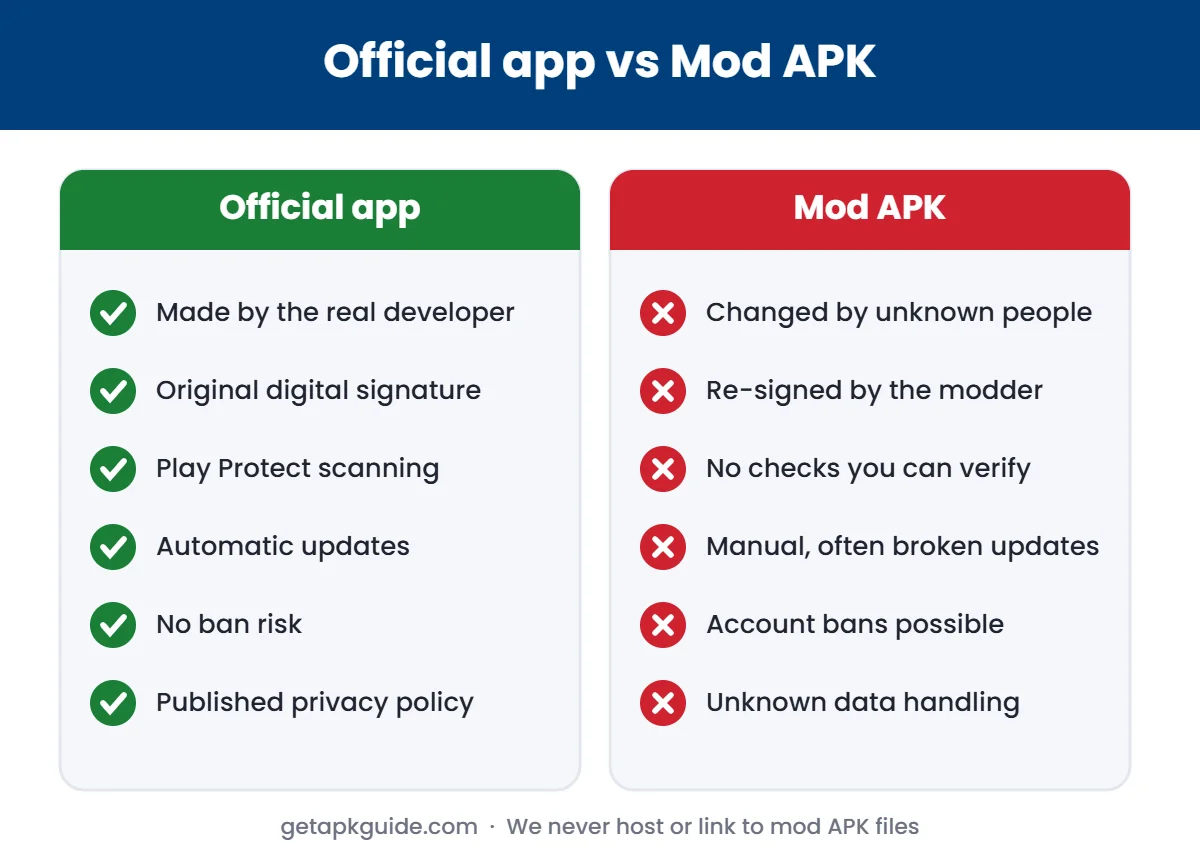
Tempted by a “premium unlocked” version? Read Lightroom Mod APK risks to see what free Lightroom already includes.
FAQ
Is Snapseed better than Lightroom?
For free editing, yes. For RAW, sync and batch editing, Lightroom Premium is stronger.
Is Snapseed still free in 2026?
Yes. Snapseed 4.0 and 4.1 remain free with no subscription, watermarks or in-app purchases.
Can Lightroom be used for free?
Yes. Lightroom mobile’s free tier includes most editing tools. Premium adds RAW, cloud sync, healing, masking and batch editing.
Snapseed vs Lightroom for beginners?
Snapseed is easier to start with thanks to its Looks and one-touch tools, so beginners can try it first and move to Lightroom later.