Remini Pro: Price, Features, Free Trial & How to Cancel (2026)
Remini Pro is the paid subscription of Remini, the AI photo enhancer made by Bending Spoons. The plan removes ads and watermarks, gives higher-quality results and unlocks extra features such as video enhancement. This guide explains what the plan includes, what it costs, how the free trial works, how to cancel, and why a “Remini Pro APK” from a mod site is a bad idea.
Prices and features change often and differ by country, so always confirm the current offer inside the app before you pay. For the free version, see our Remini APK guide.
Official Remini download (safe and free to install)
- Android: Remini on Google Play
- iPhone / iPad: Remini on the App Store
- PC / browser: remini.ai (official website)
These are the only official sources. Pro features are unlocked inside the official app, often with a free trial.
Remini free vs Remini Pro
| Feature | Free | Remini Pro |
|---|---|---|
| Basic AI photo enhancement | Yes, with daily limits | Yes, higher limits |
| Ads | Yes | No |
| Watermark on exports | Yes | No |
| High-quality exports | Limited | Yes |
| Batch processing | No | Yes |
| Video enhancement | Limited or not available | Yes |
Source: feature summary based on TechRadar’s overview of Remini. Exact limits change with app updates.

How much does Remini Pro cost?
The subscription is sold in-app through Google Play or the App Store. TechRadar lists a Remini Pro Weekly plan at US$9.99, but prices vary by country, currency and platform, and offers change. Check the exact price on the subscription screen in the app, and on your Google Play payments page, before confirming.
- Weekly plans look cheap but add up quickly over a month.
- Longer plans, when offered, usually cost less per week.
- Taxes and local pricing apply in India, Pakistan and other countries.
Remini Pro free trial: what to know
Remini sometimes offers a free trial before the paid plan starts. Many users only notice the subscription when they are charged, so read the screen carefully:
- Note the trial length and the date the first payment will be taken.
- Check which plan the trial turns into (weekly or yearly). Some users have reported trials that converted to a yearly charge.
- Set a reminder a day before the trial ends if you do not want to continue.
Remini Pro App: How to Get It on Android and iPhone
There is no separate “Remini Pro app” to download. Remini Pro is a subscription inside the normal Remini app. Many sites offer a “Remini Pro app” or “Remini Pro APK” download, but those are modified copies, not a different official product.
- Install Remini from Google Play (Android) or the App Store (iPhone).
- Open the app and tap the Pro or upgrade button.
- Choose a plan or start a free trial if one is offered.
- Confirm the payment through Google Play or Apple.
- Pro features unlock instantly in the same app.
Because Pro is linked to your Google Play or Apple account, you can restore it on a new phone by signing in with the same account. A modded “Remini Pro app” cannot do this and can stop working at any time.
How to subscribe the official way
- Install Remini from Google Play.
- Open the app and tap the Pro or upgrade button.
- Choose a plan and review the price and renewal terms.
- Confirm with your Google Play payment method.
- Your subscription now appears in Google Play under Payments & subscriptions.
How to cancel Remini Pro on Android
Deleting the app does not cancel the subscription. Cancel it in Google Play:
- Open the Google Play Store.
- Tap your profile icon, then Payments & subscriptions → Subscriptions.
- Select Remini.
- Tap Cancel subscription and follow the steps.
You usually keep paid features until the end of the period you already paid for. If you were charged by mistake, you can ask for a refund through Google Play’s refund request page; approval is not guaranteed and depends on Google’s and the developer’s policies.
Using Remini Pro features step by step
Once your subscription is active, the workflow is the same as in the free app, just without ads, watermarks and tight limits. The basic steps are shown below.
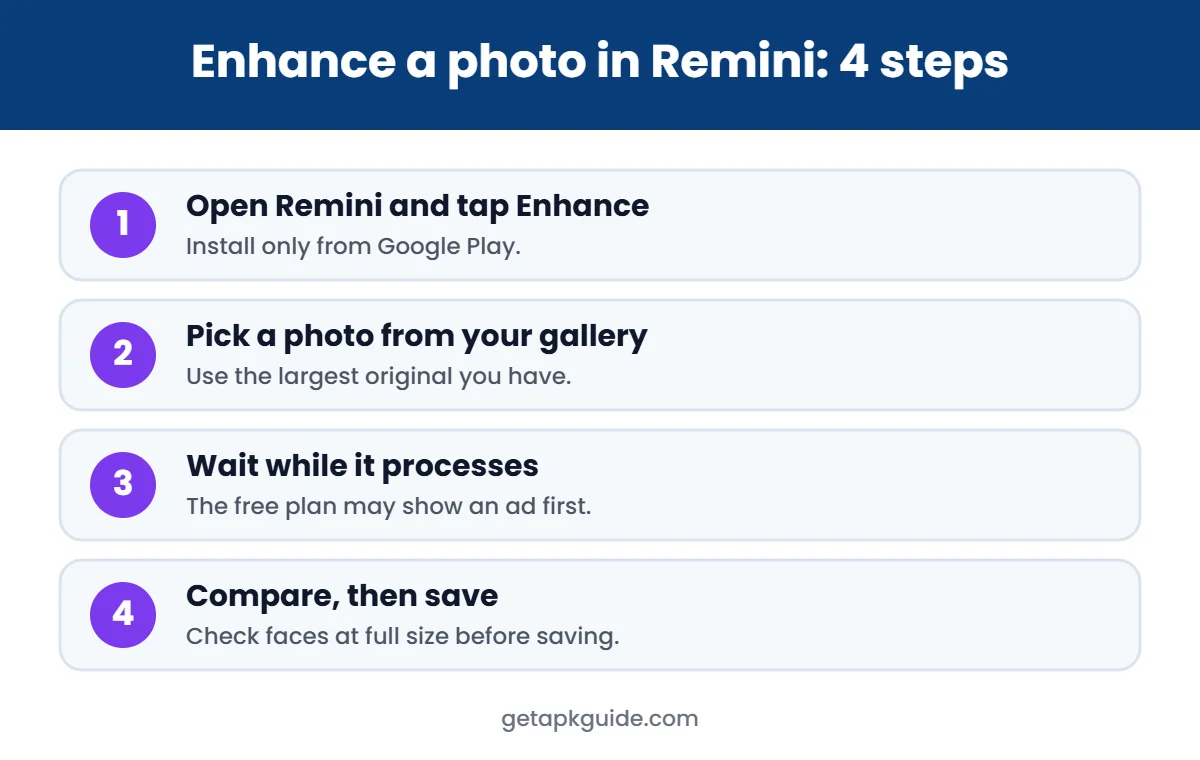
- Choose the enhancement type that fits your photo; old portraits and blurry selfies need different settings.
- Process a few test photos first and compare them at full size.
- Export in the highest quality available to your plan.
- Keep your originals in a separate album so you can redo an edit later.
Working in small batches makes it easier to spot over-processed faces before you share them with family.
Remini Pro APK and “Remini Pro mod”: why to avoid them
Search results are full of “Remini Pro APK free” and “Remini Pro mod unlocked” downloads. These files are not made by Bending Spoons:
- Modified code: someone changed the app to bypass payment, and you cannot see what else they changed.
- Your photos are sensitive: face photos uploaded through a tampered app could be collected or misused.
- Often fake: many “Pro” mods do not work at all, because Remini processes images on its servers and checks your account.
- Legal and account risk: using paid features without paying breaks the app’s terms.
Our detailed guide on Remini Mod APK risks explains this further.
Is Remini Pro worth it?
| You should consider Pro if… | Stick with free if… |
|---|---|
| You restore many old family photos | You enhance only a few photos a month |
| You need watermark-free, high-quality exports | A small watermark is acceptable |
| You want video enhancement | You only edit still photos |
| You dislike ads | You can wait for daily limits to reset |
Cheaper and free alternatives
If the subscription is too expensive, there are legitimate options. Snapseed is free, and Google Photos offers editing tools on many phones. On a computer, free open-source upscalers can sharpen images without a subscription. See our full list of Remini alternatives, or use Remini on a computer through the official web app as explained in our Remini for PC guide.
Tips for better results (free or paid)
- Use the original photo file, not a screenshot or a WhatsApp copy, which is already compressed.
- Scan printed photos flat with good light instead of photographing them at an angle.
- Crop to the face or subject before enhancing; the AI focuses on what is in frame.
- Compare before and after at full size. If faces look plastic or change shape, use a lower-strength option or another tool.
- Keep the original. AI can invent details that were never there, which matters for family history and documents.
Privacy: what happens to your photos?
AI enhancers like this one usually process photos on the company’s servers, not only on your phone. Before uploading:
- Read the app’s privacy policy, especially the sections on how long images are kept and whether they are used to improve the service.
- Avoid uploading ID cards, documents or photos of other people without their permission.
- Delete projects you no longer need inside the app, and check whether the app offers a data deletion request.
Subscription problems and fixes
| Problem | What to try |
|---|---|
| Paid but features still locked | Tap Restore purchase in the app and make sure you are signed in with the same Google account |
| Charged twice | Check Google Play order history; contact Google Play support with both order numbers |
| Payment failed | Update your payment method in Google Play → Payments & subscriptions |
| Switched phones | Install the app on the new phone with the same Google account and restore the purchase |
If a problem continues, contact the developer through the support link on the app’s Google Play page. Keep screenshots of receipts and error messages; they make support requests much faster.
How to check you have the official Remini app
Because so many copies and “mod” versions exist, it is worth confirming that the app on your phone is the real one before you pay for anything:
- Open Google Play and search for Remini.
- Check that the developer listed is Bending Spoons.
- Open Settings → Apps → Remini → App details in store on your phone; it should open the same Play Store listing.
- If the app came from a website, uninstall it and install the Play Store version instead.
Paying inside a fake copy can expose your payment details, so never enter card information in an app you installed from an unknown site.
How to save money on AI photo enhancement
- Use the free tier for occasional photos and wait for the daily limit to reset.
- Enhance only your best shots instead of every photo.
- Try free tools first for light blur; keep the subscription for badly damaged prints.
- Subscribe for one short period when you have a batch of photos, finish the batch, then cancel.
- Check whether a family member already has a plan you can use legitimately on the same platform.
Planning a short burst of work and cancelling afterwards is often cheaper than leaving a weekly plan running for months.
Remini Pro vs free alternatives: a quick cost check
Before subscribing, compare what you actually need with what free tools already do:
- One or two blurry photos: the free tier or Snapseed is usually enough.
- A box of old family prints: a short paid period can make sense; finish the batch, then cancel.
- Regular social media content: free editors handle colour and light; AI enhancement is only needed for damaged or very small images.
Thinking in projects rather than ongoing payments keeps the cost under control. Whatever you decide, use only the official app from Google Play and manage payments through your Google account, where you can see and cancel every subscription in one place.
FAQ
Is Remini Pro free?
No. Remini has a free tier with ads, limits and watermarks. The paid plan is a subscription, sometimes with a free trial.
Does Remini Pro work on PC?
Remini offers a web app. Features and plans on the web can differ from the mobile apps, so check what your subscription includes.
Is Remini Pro APK safe?
A “Remini Pro APK” from a mod site is not the official app and is not safe. Get Remini from Google Play and subscribe inside the app.
Why was I charged after the free trial?
Trials renew automatically unless you cancel before they end. Cancel in Google Play → Payments & subscriptions.
Source for pricing and features: TechRadar’s Remini overview.