Remini Baby Filter 2026: How It Works & Is It Safe?

The Remini baby filter went viral on TikTok because it promises something fun: a picture of what your future child might look like. You add photos of yourself and your partner, and Remini’s AI creates baby and toddler images that mix your features. This 2026 guide explains how the Remini baby filter works, how to use it step by step, what it costs, how accurate it is, and the privacy questions you should think about before you upload your face.
Quick answer: the Remini baby filter is part of Remini’s AI Photos feature in the official app from Bending Spoons. It is safe to download from Google Play or the App Store, but it needs clear photos of your face, and those photos are processed on Remini’s servers. The images it creates are AI guesses for fun, not a scientific prediction.

Official Remini download (safe and free to install)
- Android: Remini on Google Play
- iPhone / iPad: Remini on the App Store
- PC / browser: remini.ai (official website)
These are the only official sources. Pro features are unlocked inside the official app, often with a free trial.
What Is the Remini Baby Filter?
Remini is best known as an AI photo enhancer that sharpens blurry and old photos. In 2023 it added AI-generated portraits, and one style became a social media trend: the “AI baby” or Remini baby filter. In July 2023, users on TikTok began posting videos of the babies that Remini imagined for them and their partners, and news outlets such as ABC7 Chicago covered the trend.
The Remini baby filter is not a simple overlay like a Snapchat lens. Remini builds an AI model of your face from your selfies, then generates brand-new images in a “baby” style. Because it is generative AI, every result is a little different, and you can usually create several versions.
How Does the Remini Baby Filter Work?
The process happens in two stages:
- Training on your face: Remini asks for a set of clear selfies. Reviews of the app describe AI Photos training on roughly 8 to 12 selfies. The more varied and well-lit your photos are, the better the model learns your features.
- Adding a partner: for the baby style, you add photos of a second person, usually your partner.
- Generating images: the AI combines features from both faces and renders a baby or toddler in different poses and settings.
Remini says its AI does not use facial recognition to identify you. According to Bending Spoons’ statement to ABC7, the images are encrypted and stored with a US-based provider, and the company does not sell images to third parties (ABC7). We look at the full privacy picture further down.
How to Use the Remini Baby Filter Step by Step
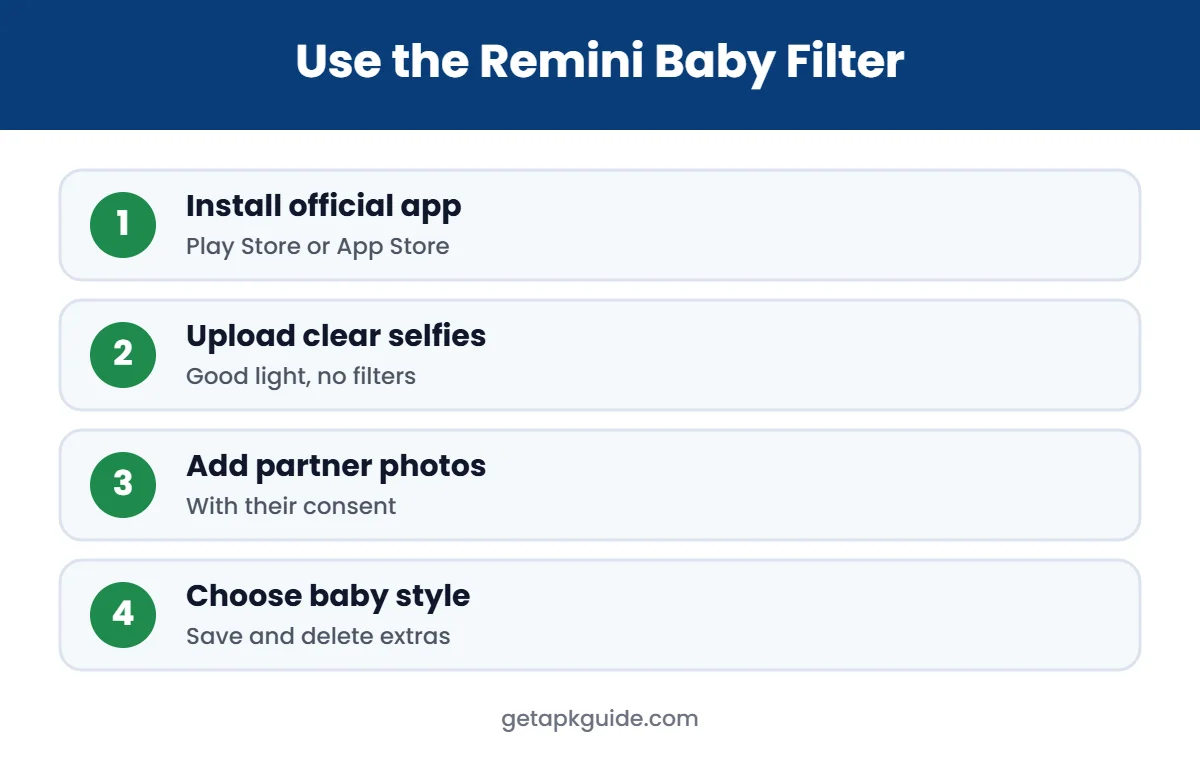
- Install Remini from Google Play or the App Store. Use the official listing from Bending Spoons, not a third-party APK site. See our Remini APK guide and Remini for iPhone guide for safe install steps.
- Open the app and look for AI Photos or the baby option on the home screen. Menu names can change between versions.
- Upload your selfies. Use photos with only your face, good light, no sunglasses and different angles.
- Add photos of your partner when the app asks for the second person.
- Choose the baby or kids style and start the generation.
- Wait for the results. Generation runs on Remini’s servers, so it can take a few minutes.
- Save the images you like, and delete the ones you do not want to keep.
If you are on a computer, you can also use the Remini web version, but AI Photos features are mainly designed for the mobile app.
Tips for Better Remini Baby Filter Results
- Use sharp photos: blurry or heavily filtered selfies confuse the model. If an old photo is soft, try fixing blurry photos with Remini first.
- Avoid beauty filters: smoothing filters change your real features, so the Remini baby filter has less to work with.
- Mix angles and expressions: front, left, right, smiling and neutral.
- One face per photo: group photos make it harder to learn who is who.
- Similar lighting for both people: it helps the AI blend skin tone and features more evenly.
Is the Remini Baby Filter Free?
Remini is free to download and contains ads and in-app purchases. AI Photos generations are limited. Remini’s own help center says AI Photos has a maximum number of generations, that the limit resets every day, and that a paid subscription may be needed to keep using the feature (Remini Help Center). In many regions the Remini baby filter is effectively a paid feature or comes with a free trial.
| Option | What you get | Cost |
|---|---|---|
| Free app | Basic enhancements with ads and daily limits | Free |
| AI Photos (baby filter) | Generated baby and kids images | Limited; often needs Pro or a trial |
| Remini Pro | More generations, fewer limits, no watermark | Weekly or yearly subscription (price varies by country) |
Check the exact price on the Google Play or App Store screen before you confirm, and cancel any trial you do not want to keep. Our Remini Pro guide explains plans and how to cancel, and our Remini credits guide explains daily limits. Avoid “free unlimited” offers from Remini Mod APK sites; they are unofficial and can be unsafe.
How Accurate Is the Remini Baby Filter?
Not very, and that is important to understand. Real children inherit a random mix of genes from both parents, including features neither parent shows. The Remini baby filter only sees the surface of your photos, such as face shape, skin tone, eye colour and hair, and creates a plausible blend. It cannot know anything about genetics.
Treat the results like a fun portrait style, not a prediction. Two runs with the same photos can give quite different babies, and changing the lighting in your selfies can change the result.
Is the Remini Baby Filter Safe?
There are two separate questions: is the app safe to install, and is it safe to share your face?
App safety
The official Remini app is published by Bending Spoons and has more than 500 million downloads on Google Play. If you install it from Google Play or the App Store, it goes through those stores’ checks. The risk comes from unofficial copies. Fake “Remini Pro” or “unlocked baby filter” APK files are modified by unknown people and can carry malware. Read how to install APK files safely and keep Google Play Protect turned on.
Privacy and your face data
- Your photos go to the cloud: the Remini baby filter needs to upload your selfies and your partner’s photos to Remini’s servers for processing.
- Company statements: Bending Spoons told ABC7 in 2023 that it does not use facial recognition, that images are encrypted, and that it does not sell, lease or trade images to third parties.
- Retention: in 2023, Brazilian outlet Itatiaia reported that Remini’s privacy policy allowed some user data to be kept for up to 10 years after you stop using the service. Policies change, so read the current privacy policy linked from the app store listing.
- Deletion: you can delete your AI profile in the app settings and ask Bending Spoons to delete your data. The 2023 reports named privacy@bendingspoons.com as the contact.
- Consent: only upload a partner’s photos with their permission.
A cybersecurity expert quoted by ABC7 advised reading the terms before uploading, because your likeness is personal data. That is good advice for any AI face app.
Common Remini Baby Filter Problems
- “Rate limited” error: you reached the AI Photos limit. Remini says the limit resets daily, or you may need a subscription.
- Results look nothing like you: retrain your AI profile with clearer selfies. Remini’s help center suggests deleting or retraining the AI profile in Settings.
- Generation stuck or failing: switch between Wi-Fi and mobile data, turn off any VPN, update the app and free up storage.
- App will not install: see our App Not Installed fixes and full Remini not working guide.
Should You Share Your Remini Baby Filter Results Online?
The Remini baby filter trend is mostly about sharing reactions on TikTok, Instagram and WhatsApp. Before posting, think about who is in the image. The generated baby is not a real child, but it is built from two real faces, and some couples later regret posting very personal content. A few simple rules help:
- Ask your partner before posting anything made from their photos.
- Avoid adding full names, locations or other personal details to the post.
- Do not upload photos of other people, celebrities or friends without permission.
- Never use the Remini baby filter on photos of children.
Remini Baby Filter on Android vs iPhone
The Remini baby filter works the same way on Android and iPhone because the AI runs on Remini’s servers, not on your phone. The differences are small: menu layout, how subscriptions are billed (Google Play or Apple ID) and how you grant photo access. On Android, make sure Remini can access the photos you select; on iPhone, choose Full Access or select the exact selfies in the Photos permission screen.
Remini Baby Filter Alternatives
If you do not want to upload your face to Remini, you have a few options. Some other AI photo apps offer similar “future baby” styles, but they raise the same privacy questions, so check each one’s policy. For normal photo editing without face training, see our lists of Remini alternatives and the best photo editor apps.
FAQ: Remini Baby Filter
How do I get the Remini baby filter?
Install the official Remini app, open AI Photos, upload your selfies, add your partner’s photos and choose the baby style.
Is the Remini baby filter free?
It has limits. Remini says AI Photos generations are capped and reset daily, and continued use may require a paid subscription or trial.
Is the Remini baby filter accurate?
No. It creates an AI blend of visible features for fun. It cannot predict what a real child will look like.
Is the Remini baby filter safe?
The official app is safe to install from Google Play or the App Store. You are sharing face photos, so read the privacy policy and delete your AI profile when you are done.
Can I use the Remini baby filter on iPhone?
Yes. Remini is available on the App Store. See our Remini for iPhone guide for details.