Remini Guides: Features, Install & Safety

Everything about Remini – AI Photo Enhancer in one place: what the official app does, what’s free, how to install it safely, how to fix problems, and why “Remini Mod APK” files are risky. Every guide is checked against the official listing.
- Developer
- Bending Spoons
- Official source
- Google Play · remini.ai
- Last updated
- 15 Oct 2026
- Downloads
- 500M+ (Google Play)
- Android
- Android 7+ recommended
- Price
- Free · ads · in-app purchases
All Remini guides

Remini Baby Filter 2026: How It Works & Is It Safe?
How the Remini baby filter works, what it costs, how accurate it is and the privacy risks.
Remini Credits: What They Are & How to Get More
What Remini credits are, when they reset, Pro and Lite prices, and safe ways to get more.

How to Restore Old Photos with Remini (2026 Guide)
Step-by-step guide to restore old photos with Remini: scanning, enhancing and natural results.

How to Fix Blurry Photos with Remini (2026)
How to fix blurry photos with Remini on Android, iPhone and PC, plus what it cannot fix.

Remini Not Working? 8 Fixes That Work in 2026
Remini not working or stuck on processing? 8 proven fixes for the app and Remini Web.
Remini Video Enhancer 2026: How It Works, Limits & Price
How the Remini video enhancer works in 2026, where to use it, reported limits, pricing and tips for…
Remini for iPhone: How to Download, Use & Cancel Pro (2026)
How to download Remini for iPhone and iPad from the App Store, use it, manage Remini Pro and…
Remini Pro: Price, Features, Free Trial & How to Cancel (2026)
What Remini Pro includes, how much it costs, how the free trial works, how to cancel on Android,…
Remini for PC: How to Use It on Windows & Mac (No Download)
How to use Remini for PC on Windows or Mac through the official web app, why “Remini PC…
6 Best Remini Alternatives for Android (Free & Paid)
Looking for Remini alternatives? Compare six legit AI photo enhancers and free tools for unblurring, upscaling and restoring…
Remini APK: Features, Free vs Pro, and How to Install It Safely
Official Remini features, free vs subscription limits, and how to install Remini safely on Android from Google Play…

Remini Mod APK: What It Is, the Risks, and Safe Ways to Get Pro Features
What Remini Mod APK really is, why modified builds are risky, and legitimate ways to get Remini Pro…
Where to start
New to Remini?
Features, free vs Pro, installation and how to cancel a subscription.
Thinking about a mod APK?
What “Pro unlocked” builds really are and the legal ways to get Pro features.
Remini won’t install?
Fixes for “App not installed”, parsing errors and Play Protect blocks.
What Remini can and can’t do
The app is strongest at one job: rebuilding detail in faces. It works best on portraits, selfies and group photos where faces are small, soft or damaged. It is not a full photo editor like Photoshop or Snapseed.
| Works well | Works less well |
|---|---|
| Old family prints scanned with a phone | Landscapes and text-heavy images |
| Blurry or out-of-focus selfies | Photos with no visible faces |
| Low-resolution pictures from chat apps | Heavily cropped images with almost no detail |
| Scratched or faded vintage photos | Anything needing exact, unchanged facial features |
Because the AI rebuilds missing detail, results can look slightly different from the real person. Compare before and after carefully for photos where accuracy matters, such as ID or memorial pictures.
Free vs Pro at a glance
| Free | Subscription | |
|---|---|---|
| Photo enhancements | Yes, with daily limits | Unlimited (per plan terms) |
| Ads | Yes | No |
| Watermark | May appear | No |
| AI photos & extra tools | Limited | Included |
| Billing | — | Weekly or yearly; price varies by country |
On the US App Store, Remini Pro Weekly is listed at $9.99; always check the price shown in the app before paying. Deleting the app does not cancel a subscription — cancel in Google Play → Payments & subscriptions.
Quick fixes for common Remini problems
“Something went wrong”
Check your connection, update the app from Google Play, then clear its cache in Settings → Apps → Remini → Storage.
Stuck on processing
Enhancement happens online. Switch between Wi-Fi and mobile data, or try a smaller image.
Too many ads
Ads fund the free tier. The official options are a short subscription or the web version at remini.ai.
Won’t install
See our fixes for “App not installed” and parsing errors.
Privacy: what happens to your photos
The app processes images on its own servers, so the photos you enhance are uploaded. According to the app’s Google Play Data safety section, the developer says the app may collect data such as photos and videos and financial info, may share some data types with third parties, encrypts data in transit, and lets you request deletion. Read the full Bending Spoons privacy policy before uploading sensitive pictures.
Free and official alternatives
Web version
The same service in a browser at the official website — useful on a computer.
Google Photos
Built-in editing tools on most Android phones, free and already installed.
Other photo enhancers on Google Play
Search Google Play for “photo enhancer” and check the developer, reviews and Data safety section before installing.

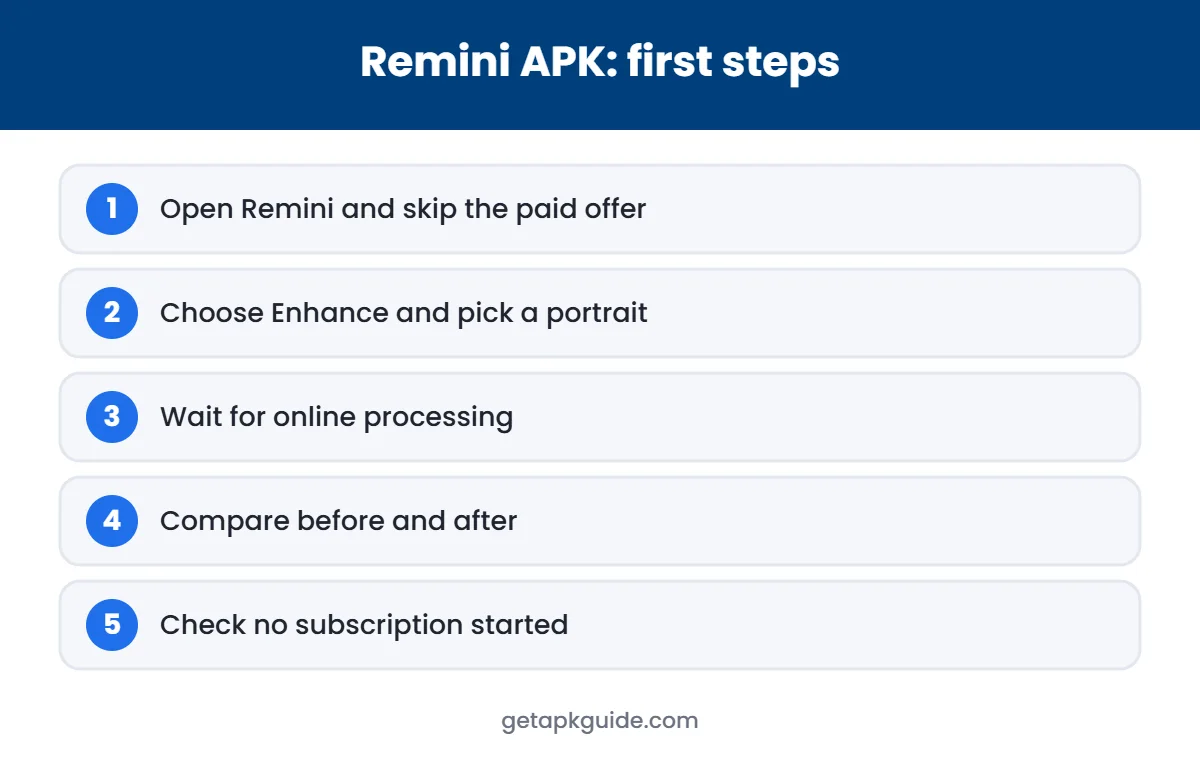
How to enhance your first photo
- Install the app from Google Play and open it.
- Tap the enhance option and allow access to the photo you want to improve.
- Choose the photo. Remini uploads it and processes it online, which can take a few seconds.
- Use the before/after slider to compare the result with the original.
- Save the result to your gallery. On the free plan you may need to watch an ad first.
Tips for the best results
Scan old prints carefully
Use good, even light and hold the phone straight above the photo to avoid glare and distortion.
Start with the largest version
Use the original file rather than a screenshot or a forwarded chat copy, which loses detail.
Crop to the subject
Cropping close to faces before enhancing gives the AI more useful pixels to work with.
Check the eyes and mouth
These areas change most. If they look wrong, try a different source photo.
Who Remini is for
It suits people who want quick, one-tap improvements to portraits: restoring family photos, sharpening selfies, or rescuing low-quality pictures from messaging apps. It is less suited to professional editing, where tools with manual controls give more accurate results. If you only need to fix a few photos, the free tier or a single week of the subscription is usually enough — remember to cancel auto-renew straight away in Google Play.
Remini on iPhone and the web
The app is also available on the Apple App Store for iPhone and iPad, and in a browser at remini.ai. The web version is handy for enhancing scanned photos already on a computer, without installing an emulator. Subscriptions bought through Google Play are managed in Google Play, and App Store subscriptions in your Apple account settings.
Avoiding surprise subscription charges
The app offers weekly and yearly plans, and weekly billing is where most complaints come from: a short trial or a single week turns into repeated charges because auto-renew stays on. To stay in control, check the exact price and billing period on the purchase screen before you confirm, and cancel auto-renew in Google Play straight after subscribing if you only need the app for a few days — your access continues until the end of the period you paid for.
Google Play also emails a receipt for every charge, so search your inbox for the app name if you are unsure whether a plan is active. For billing problems, contact Google Play support for Play purchases, or the developer at support-android@remini.ai.
Quick answers
Is Remini free?
Yes. The official app is free to install, with ads and daily limits. Unlimited use needs a weekly or yearly subscription.
Is there a safe Remini Mod APK?
No one can verify that. Mod files are re-signed by unknown people and can contain malware. Use the official app or its free tier instead.
Can I use Remini on a computer?
Yes, through the official web version at remini.ai.
Does Remini work offline?
No. Photos are processed online, so you need an internet connection.
Why does Remini change faces?
The AI rebuilds missing detail, which can slightly alter features on very blurry photos. Compare results before sharing.
How do I cancel Remini on Android?
Google Play → profile → Payments & subscriptions → Subscriptions → Remini → Cancel subscription.
Related topics
HappyMod
Risks of mod app stores and safer alternatives.
APK Install Help
Sideloading safely and fixing install errors.