How to Fix Blurry Photos with Remini (2026)

Want to fix blurry photos with Remini? Remini is one of the most popular AI tools for turning soft, out-of-focus or low-resolution pictures into sharp, high-definition images. This 2026 guide shows exactly how to fix blurry photos with Remini on Android, iPhone and the web, which types of blur it handles well, which it does not, and how to get the most natural result.
Quick answer: open the official Remini app, tap Enhance, choose the blurry photo and save the result. Remini works best on faces and slightly soft images. Heavy motion blur, tiny distant faces and blurry text are much harder, and the AI may invent details that were never there.

Official Remini download (safe and free to install)
- Android: Remini on Google Play
- iPhone / iPad: Remini on the App Store
- PC / browser: remini.ai (official website)
These are the only official sources. Pro features are unlocked inside the official app, often with a free trial.
How Remini Fixes Blurry Photos
Remini uses AI models trained on huge numbers of sharp and blurry images. When you upload a photo, it does not simply apply a sharpen filter. It predicts what the sharp version should look like and redraws fine details such as eyelashes, hair and skin texture. The official Google Play listing says Remini can unblur, sharpen out-of-focus pictures and increase the number of pixels in low-quality photos.
Independent reviews describe the Enhance tool as combining sharpening, noise reduction, facial detail improvement and colour correction, with upscaling of up to about 2x the original size (Tools for Humans review).
How to Fix Blurry Photos with Remini on Android and iPhone
- Install Remini from Google Play or the App Store. See our Remini APK guide or Remini for iPhone guide.
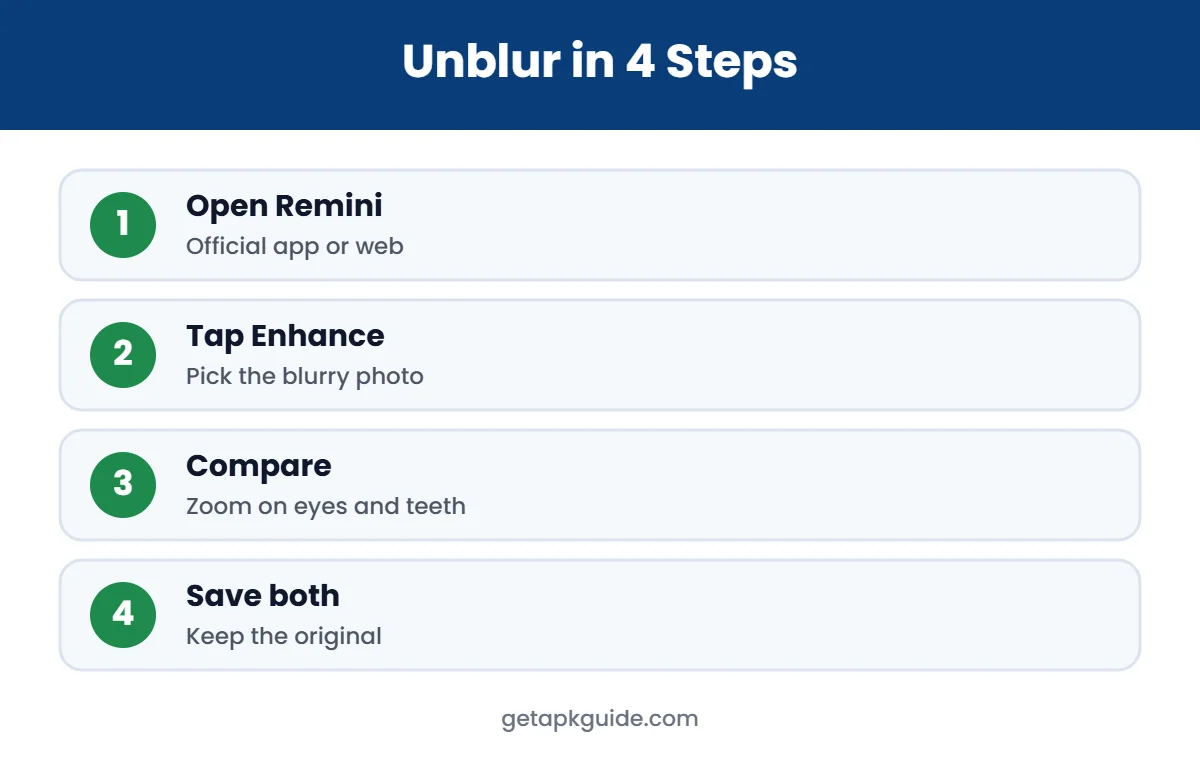
- Open the app and tap Enhance.
- Choose the blurry photo from your gallery.
- Wait while Remini processes it. Free users may see an ad first.
- Use the before/after slider to check the result, zooming in on faces.
- Tap Save. Keep the original too.
How to Fix Blurry Photos with Remini on PC
You can also fix blurry photos with Remini in a web browser on Windows or Mac. Upload a JPG, PNG or WEBP image, run Enhance and download the result. Remini’s web help notes that images larger than 2048 x 2048 pixels are compressed before processing, so very large files may not gain much. Follow our Remini for PC guide for the full steps.
What Kind of Blur Can Remini Fix?
| Type of blur | Result with Remini | Tip |
|---|---|---|
| Slightly soft focus | Excellent | One Enhance pass is enough |
| Low resolution / pixelated | Very good | Crop to the subject first |
| Old scanned prints | Very good on faces | See our old photos guide |
| Noise from night photos | Good | Do not over-enhance |
| Strong motion blur | Limited | Faces may look invented |
| Tiny faces in group photos | Mixed | Crop each face area |
| Blurry text or number plates | Poor | AI cannot recover real text |
In short, you can fix blurry photos with Remini when there is still some real detail to work with. When a face is just a few pixels, Remini creates a believable face that may not match the real person.
Tips to Get the Best Results
- Start with the best copy: use the original file, not a screenshot or a WhatsApp-compressed version.
- Crop before enhancing: cropping to the main subject gives the AI more pixels to work with.
- Enhance once: running Remini again on an already enhanced photo often makes skin look plastic.
- Check the eyes and teeth: these are where AI mistakes are easiest to spot.
- Finish in an editor: adjust brightness, contrast and colour in Snapseed or Lightroom after Remini. See Snapseed vs Lightroom.
- For old prints: scan carefully first. Our guide to restore old photos with Remini explains how.
Can Remini Fix Blurry Videos?
Yes. Remini also has video enhancement that reduces noise and sharpens footage. Video processing usually has stricter limits for free users and takes longer. Read our Remini video enhancer guide for details.
Free vs Pro for Blurry Photos
You can fix blurry photos with Remini for free, but with ads, daily caps and sometimes watermarks. Remini Pro, sold weekly or yearly in the app, removes many limits and is useful if you have lots of photos. Prices differ by country, so check the store screen before subscribing. Learn more in our Remini Pro guide and Remini credits and limits guide.
Skip “Remini Pro unlocked” downloads. A Remini Mod APK is modified by unknown people, often stops working, and can carry malware.
When Remini Does Not Fix the Blur
- The photo may be too small or too blurred. Try a better source file.
- Your connection may have dropped mid-upload. See Remini not working fixes.
- You may have reached the daily limit. Wait for it to reset or upgrade.
- For non-face images like landscapes, try other tools from our Remini alternatives list.
Why Photos Become Blurry in the First Place
Knowing the cause helps you decide whether Remini is the right tool. Most blurry photos come from one of these problems:
- Camera shake: the phone moved during the shot, often in low light. Remini can improve mild shake, but strong shake leaves streaks that are hard to fix.
- Missed focus: the camera focused on the background instead of the person. Remini is very good at rebuilding faces in this case.
- Subject movement: children, pets and sports often cause motion blur. Results vary.
- Compression: photos sent through WhatsApp, Facebook or screenshots lose detail. Remini can restore a lot of this.
- Low resolution: old phones and digital zoom create small, pixelated images. Upscaling helps.
- Dirty lens: a greasy lens creates a soft haze. Clean it before your next shot.
Remini vs Other Ways to Fix Blurry Photos
| Method | Good for | Limits |
|---|---|---|
| Remini Enhance | Faces, portraits, old prints | Can invent details; limits on free use |
| Sharpen slider in Snapseed or Lightroom | Mild softness, landscapes | Cannot rebuild missing detail |
| Google Photos editing tools | Quick fixes on supported phones | Features vary by device and plan |
| Retaking the photo | Anything you can shoot again | Not possible for old memories |
If you want to fix blurry photos with Remini and then fine-tune them, combine Remini with a manual editor. Our best photo editor apps list covers good free options.
How to Avoid Blurry Photos Next Time
- Tap on the subject to set focus before taking the photo.
- Hold the phone with both hands and lean against something steady in low light.
- Use night mode for dark scenes and keep still until it finishes.
- Avoid digital zoom; move closer instead.
- Send original-quality files instead of compressed chat copies.
Is It Safe to Upload Photos to Remini?
The official Remini app from Bending Spoons is safe to install from Google Play or the App Store. Your photos are uploaded and processed on Remini’s servers, so avoid sensitive images such as ID cards and private documents, and read the privacy policy linked from the store listing.
FAQ: Fix Blurry Photos with Remini
Can Remini really unblur photos?
Yes, especially faces and slightly soft photos. It redraws detail using AI, so results are a prediction, not a recovery of the original pixels.
Is Remini free for blurry photos?
Yes, with ads and daily limits. Remini Pro offers more enhancements.
Why does my enhanced photo look fake?
The original was probably very blurry, or it was enhanced more than once. Use the best source file and enhance once.
Can Remini fix blurry text?
Not reliably. AI is trained mostly on faces and cannot recover text that is not visible.
Does Remini work on PC?
Yes, through Remini Web in your browser.